
Spotify Social
Helping users share and soundtrack their lives
Project Overview
Expertise
Tools
I worked on this D&AD brief as a fun project. The goal is to enhance the experience of Spotify users by creating a feature that allows them share and soundtrack their lives.
My Role
I created the end-to-end user experience by carrying out user research, UX design, prototyping, usability testing and interface design.
UI/UX Design
Figma
Adobe Illustrator
Deliverables
UI Screens
UX Flow
Prototype
Design Document
Timeline
4 weeks

Problem
Spotify wants to give users a more individualised experience that encourages more meaningful connections with other users.
Goal
Make Spotify a social music app by developing a feature that lets users create and share audio content on social media.
Design Process
Define: The problem of the brief was defined to understand and identify solutions to the user’s need.
Research: I carried out analysis of key market competitors offering similar services.
Ideate: I ideated several scenarios and personas for the app, after which I brainstormed for some weeks on a solid idea.
Empathise: An empathy map was created to understand the user’s need.
Prototype: I created prototypes starting with low-fidelity and rough wireframes which were later refined to high-fidelity designs after consulting with some usability testers.
Execution
01. Research
After defining the problem, market research was carried out to analyse key competitors. I was also able to interview 5 people from different locations regarding features they would expect a social music app to have. They all gave different perspectives on the subject.
02. Affinity Mapping
The data I collected was mapped out using sticky notes and grouped based off of reoccurring themes.

03. Findings
After collecting data through research, the summary of the major themes that were grouped together were:
Social Music Apps
I discovered there were already existing social music apps such as Bopdrop and Anthems. I also found out that major competitors like Apple Music and Soundcloud already have features geared towards improving socialisation, such as Apple Music's "Exchange Play" and Soundcloud's "Repost".
Already Existing Features
Further research led me to discover that Spotify already had some features, such as Collaborative Playlists, Spotify Connect, Group Sessions on Speakers, and Spotify Live. These are also geared towards creating a sociable experience for users.
Demography
Data collected from the people I interviewed highlighted that Spotify markets to mainly millenials from age 26-34, suggesting that the newer generation of Gen-Z's (aged 18-25) are more social media savvy and would be an ideal demography to reach out to with this feature.
Obstacles
The interviewees identified potential obstacles as:
-
Spotify's user interface does not fully integrate social feeds.
-
Spotify does not readily support downloads except on premium subscriptions.
04. Personas
I created personas, mapping out their behaviour, frustrations, needs and wants.
In this case:
Behaviour: Boma is a second-year university student that loves creating content for social media. She loves listening to music and wants to connect with people of same interest.
Frustrations: Boma does not know a fun way of sharing music that people would engage with.
Wants/Needs: Boma wants to discover new music and connect with people that listen to the same music.
05. Competitive Audit

06. Empathy Map
This was created to highlight particular informations about a user, showing what they're saying, thinking, feeling, and doing.

Design Exploration
01. User Journey
This was mapped out to show the emotions the user could possibly feel while engaging with the app. It shows the user's highest point of satisfaction as well as frustrations that could occur.

02. User Story
-
As a trendsetter,
-
I want to discover new music
-
I would love an easy way to share music to friends through texts, snaps and posts
-
I'd like to connect with friends and engage with other users over a shared interest in music
-
-
As a curator,
-
I want to craft playlists to show my knowledge of music
-
I want to build a community of others who love to share too
-
I value following and being followed for my taste in music
-
I love collaborating on playlists virtually even with people I've never met before
-
I'd like to carefully select and arrange playlists
-
03. Ideation and Sketching
I brainstormed some ideas and features by making initial sketches aimed at achieving the goal of this brief.


04. Site Map
This was done to map out the organisation and structure of the app, in order to allow me visualise how the different screens and actions are related to each other.

05. Low-fidelity Prototype
When creating this wireframe, I made sure to incorporate key user goals, such as the ability to search for rooms, check trending music, start a listening party, and connect with other users in real time.

06. Visual Elements
I used Spotify's already existing colour palette, having green as the main colour and making purple a secondary colour to complement it. This was used in the creation of buttons and icons which were created in Figma. I used Gotham Family font as the primary font for the app. The Spotify logo was modified to Spotify Social.

07. Final Screens
Why Spotify Social? While using the Spotify app, users want to feel more connected. The inclusion of this feature to Spotify will promote social listening and give users a personalised experience, enabling them to share audio that is most important to them by utilising their influence or reach. Users can login or signup to create new accounts. Users can also login using Google, Facebook, or Twitter.

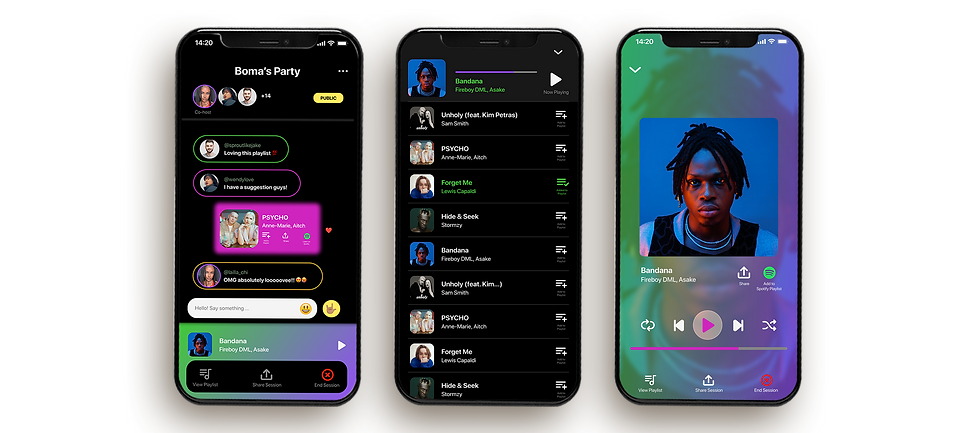
Listening Party: Users today want to feel more connected while listening to music on the Spotify app. The addition of this functionality to Spotify will encourage social listening while providing a personalised experience for users, allowing them to share audio that is most significant to them by leveraging their reach or influence.


Live Sessions: Users can listen to songs arranged on a queue, suggest songs, and share the session to their social feeds as they please.
User Profiles: Users can see friends list as well as search for friends. They can chat up these friends on the app only if direct messaging has been enabled on the original Spotify app. Users can also see people their friends have recently followed as well as recently played music. Users can edit their profile and access other settings through the menu bar.

Notifications: Users can see alerts of recent activities and upcoming prescheduled activities through this page/screen.